|
The scope of
this site is to inform the visitors on a specific product relevant to
“Telephone Charges” or otherwise “Call Accounting”.
Such product
is necessary in order to control the telephone center of an enterprise or,
more precisely, to estimate cost and distribute calls in specific centers or
departments of the enterprise.
PC-TEL is
the most popular program of call record and call accounting in real time,
which make it a necessary consultant for modern businessman or people who
are involved in the telecommunication part of a business. Designed by
ntafyl Hellas sa, a company offered significant technology innovation in Greek
market, offers much more than any other product in its category.
Cost
account, control, notification, calls statistic analysis, prompt response to
any query, are some of the easy accessible PC-TEL functions.
Is it
easy for you and your business to get such a system and enjoy the benefits
in your every day life?
By the time
you decide to acquire PC-TEL, ntafyl Hellas Sales Department is prepared for
“next day installation” as our engineers name it.
The
equipment required in order to install the product, depends on the amount of
information and the needs of each enterprise.
The figure
below represents a typical installation of PC-TEL at a medium enterprise
which uses a call center with 50 internals in LAN Ethernet topology.
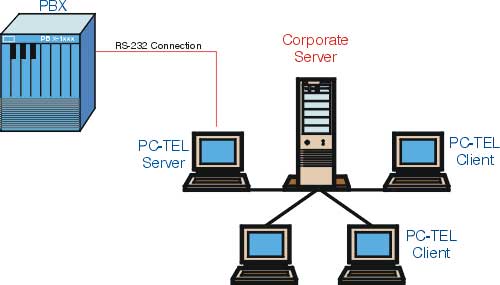
Typical interconnection between call center and PC-TEL
We observe
that call center is connected to a network PC, named PC-TEL server, which
records every terminated phone call in real time.
Network
users can extract data from the system, using the client part of the
application.
PC-TEL
server, except from recording may be employed in different tasks, like
secretarial support etc.
Necessary
Installation Equipment
1.
Connection wire to the call center (obligatory)
RS-232 type
according to call center manufacturer
2. P/C
(obligatory) Depending on application
Case 1
Case 2
Case 3
3. For
remote access we recommend: (Optional)
Modem with
speed 56K V90
PC-ANYWHERE Host, Version 8 or higher
Case 1
Local
installation, 0-100 internals, Pctel Connection Module and Pctel in the same
system
a) PII-233,
64MB Ram, 6.4GB HD, VGA 800 x 600, 256 colors, Win98/WinNT4 (SP 6a)/Win
2000, with Internet Explorer and Outlook, optional local or network printer
inkjet/laser
b) The
above system may have any Microsoft Approved application installed
c)
Minimum hard disk free space 45MB, while each call needs another 400 bytes
of free space
d)
Except from screen saver all energy save
options must be deactivated. The Power Scheme of Power Options in Control
Panel must be Always on and the option “turn off hard disks”
Never
e) PC
must have a RS-232 communication port to connect pc with call center
permanently
f) A
serial cable to connect pc to the PBX serial port, in order to provide data
to the pc regarding calls. Windows HyperTerminal provides call account data
on pc monitor when connected to the call center assuring proper operation
g) It
is obvious that PC must be always turned on and module pctelserver always in
operation
Case 2
Installation
for network use or installation of pctelserver and pctel in different
systems, 0-100 extentions
a)
Pctelserver’s system must be: PIII-350, 64MB
RAM, 6.4GB HD, VGA 800 x 600,
256
colors, WinNT 4 (SP6a) / WIN 2000 with Microsoft TCP/IP with Internet
Explorer and Outlook, optional local or network printer inkjet/laser
b)
The
above system may have any Microsoft Approved application installed.
Installation in NT Server is also safe. (In this case there is no need for
new server installation, system application must be Microsoft Approved).
c)
Minimum hard disk free space 45MB, while each call needs another 400 bytes
of free space
d)
Except from screen saver all energy save
options must be deactivated. The Power Scheme of Power Options in Control
Panel must be Always on and the option “turn off hard disks”
Never
e)
PC
must have a RS-232 communication port to connect pc with call center
permanently
f)
A
wire to connect pc to the call center in order to provide data to the pc
regarding calls. Windows HyperTerminal provides call account data on pc
monitor when connected to the call center assuring proper operation
g)
It is
obvious that PC must be always turned on and module pctelserver always in
operation
h)
Systems used as client must be at least PII-233, 64MB Ram, 6.4GB HD, VGA 800
x 600, 256 colors, WIN98 / WinNT 4 (SP6a) / WIN 2000 with Internet Explorer
and Outlook, optional local or network printer inkjet/laser
Case 3
For any
other type of installation:
a)
Please contact the technical department in order to determine minimum
specifications
b)
Hardware specifications depend:
·
Number of internals
·
PBX
type
·
Connection type with other PBX
·
Business case
·
Critical application
|